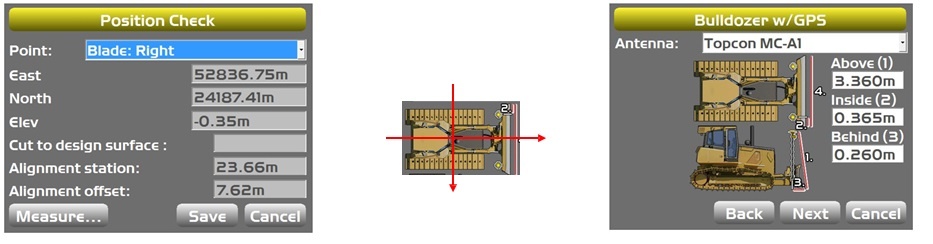
Set Machine and system for position check
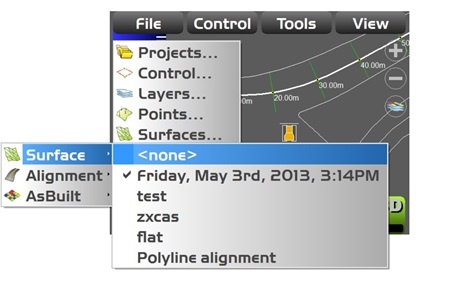
Firstly we need to turn off our active surface by selecting FILE-ACTIVE-SURFACE-NONE this will remove any potential errors brought in to our position check from sloping surfaces.
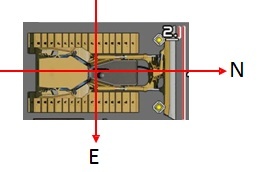
Ideally for ease of adjustments we would orientate the machine to face North. By doing this any errors in position are easily adjusted as we know which direction the errors are in relation to the blade position.
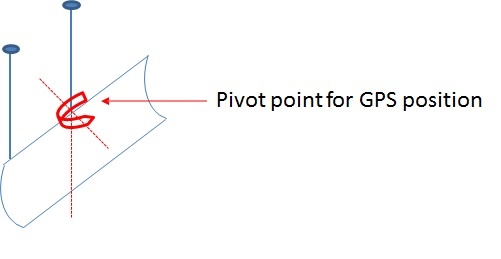
Understanding the Pivot Point
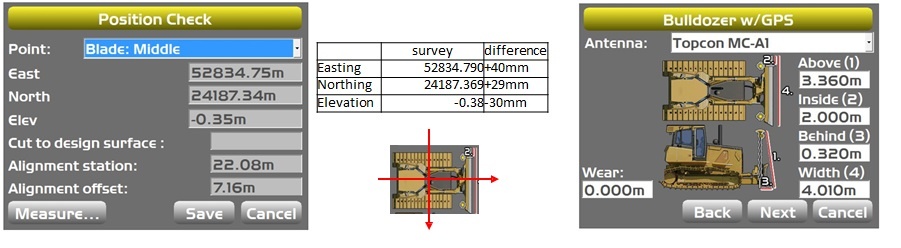
In order to carry out a position check in the correct method it must be noted that the Topcon system is based on having the Main antenna based at the centre of the blade. This means that the orientation of the blade revolves around the centre mast, so it is this position which we must check first in order to fix the pivot point position. Once this is achieved minor adjustments to the right hand mast will also correct the left hand side.
Position check and adjustment to position
In this example we have orientated the machine North and checked the centre mast position ( TOOLS-POSITION CHECK)which has given us the errors shown in the table. To adjust the machine file to remove these errors, go to CONTROL- MACHINE SETUP-EDIT and press next until you reach the measurement screen for the centre mast. As the machine blade is facing North/ East we simply need to adjust the measurements for Above (Elevation), Inside (Easting) and Behind (Northing).
Left hand blade adjustment and position check
We can now repeat the previous steps for the right hand mast, again adjusting the Above (Elevation), Inside (Easting) and Behind (Northing) if required. Due to the centre and right masts now being correct in position and elevation this will automatically bring the left hand side into tolerance.